Category: House

  • LAN Wiring 101

    I am getting a remedial course in network wiring this week. I’ve been lucky in the past, as all of my CAT 5/6 wiring has “just worked”. Sadly, my luck ran out the other day, when I tried to rewire the uplink for a 5-port switch in my basement office. I have two uplink wires running to my basement patch panel, and oddly, the switch’s jack worked when patched through to one of them, but not the other. Both uplinks worked when I plugged my laptop into them directly, so I was rather baffled. At that point, I decided it was finally time to invest in a network cable tester. I picked up a Klein LAN Scout Jr 2 from Lowe’s, and it immediately identified the problem: The switch’s jack’s wiring was bad (pins 1&2 open), uplink 1 was wired straight, and uplink 2 was wired crossover. The good news was that of the 7 jacks I tested, only 2 turned up bad, and they’re both short runs that wouldn’t be too hard to replace if I choose. Interestingly, both of the older jacks that I rerouted to the patch panel were wired crossover. It was 10 or 15 years ago that I installed the jacks, and I thought I remembered wiring everything with T568B, but apparently, I was wrong. I probably won’t bother re-punching them, as I don’t use either jack much (one of them I had actually never wired up) and they both still work thanks to Auto-MDIX. I do know now to check the wiring at the other end before punching a wire in to the patch panel (you’d think that would be obvious, but this is me we are talking about). As for the bad jacks, I’m not sure if the issue is with the cables or the punches (or both), but either way, it’s good to have a way to test the wiring. As a case in point, I crimped an RJ45 plug this evening, and accidentally swapped pins 1 and 2. Without the cable tester, I likely wouldn’t have known about it until something didn’t work right, and then I would have been pulling my hair out. I’d say the tester paid for itself right there.

    Update 2/28: Mystery solved- both bad jacks turned out to be wires that weren’t punched all the way down in the patch panel. After fixing that, they both test good. The basement patch panel is now fully wired, with 4 free jacks available for future use. Next up is the library closet. As an aside, so far, every jack I wired “back in the day” has turned out to be T568A.

  • Winter Projects

    Winter Projects

    I’m no longer quite the home improvement addict I used to be “back in the day”, but in the wintertime, I like to have at least one project to keep me busy around the house. Otherwise, I end up wasting too much time on the computer when I’m home. As I wrote earlier, I’m currently working on some home LAN upgrades. I’ve had something of an epiphany in the 3 days since that post. After waffling over where I should mount my switches and run my new wires, I did some reading and learned more about structured wiring, and now, rather than terminating my wiring at switch ports, I’m installing CAT-6 patch panels. That will give me permanent termination points for all of my existing wiring, which I can then patch into switches as needed. Right now, I’m in the process of wiring the first panel up in the basement boiler room, which will handle all of the cabling that runs through the west half of the basement. There are two existing CAT-5e cables that run from this area up to the switch in the library closet. My original plan was to run a single CAT-6 uplink and pull the two CAT-5e cables out, but now I’m going to leave the latter in place as well, and terminate them at the patch panel I intend to install in the library closet. That will let me move things around between the basement and upstairs switches as needed, just by moving patch cables around. The more I think about it, the more I understand why large enterprise LANs are wired this way. It might be overkill for most houses, but for this house with all of its wiring challenges, I think it makes a lot of sense. After I finish the basement, I’ll move on to the library closet. After that, I want to put something on the east side of the house, but I haven’t made up my mind exactly where yet.

    My next project arose out of necessity. Our pool is losing water at a rather alarming rate in the winter. This year, it is down over 2 feet since we closed it. Before the big 2026 SnowCrete Apocapalypse, we took the cover off, as the water level was too low to support a snow load on the cover. That gave me an opportunity to observe the water level every day. It continued to drop for a while, and now it seems to finally have stabilized at around where the light fixture conduit enters the pool in the shallow end (the deep end conduit is a couple inches lower). This is a common place for in-ground concrete pools to start leaking, as the sealant starts to fail over time. I suspect that what sealant is still there is hardening and shrinking in the winter, causing the pool to lose water in cold weather (it doesn’t seem to lose water nearly as fast in the summer).

    Today, with the pool water mostly un-frozen, I put my hip waders on, got in the pool, and pulled the shallow-end light fixture out. Then, I looked over and saw that the deep-end fixture had fallen out of its niche on its own. Not sure how or when that happened, but I’m guessing it might have been from freeze-thaw, with the water level being so low. I took a couple of photos of the shallow end niche, but after some recent rain, the conduit opening was still underwater, and it was a little hard to see how much (if any) sealant was there. Before the water leaks back down, I think I’m going to try to do a dye test to confirm that it’s leaking there. Regardless, I think it’s about time for new light fixtures. The existing fixtures still work, but they’re very old 500-watt monsters made by Paragon, a company that is no longer around.1 A company called Spa Electrics makes a nice-looking retrofit 12-volt LED fixture that I think I could use. Two lights plus a required transformer will set me back $1700 or so (nothing is cheap in the world of pools) but with the pool already partially drained, and needing to fix the leak either way, it seems like a good time to take the plunge (no pun intended).

    1. Looks like Paragon is now owned by Pentair, and they previously sold a very similar-looking LED retrofit called the SlimLite. However, it appears that it has been discontinued. ↩︎
  • Random stuff

    I’m battling off-and-on dizziness again, similar to what I had back around the end of last year. Still unsure what causes it. As with last time, it’s not room-spinning vertigo, just more of a spacey, lightheaded feeling. Various things I’ve considered as possible causes:

    • Allergies/Environmental
    • TMJ issue (chewing/clenching/jaw tension)
    • Low blood pressure/low heart rate
    • Low electrolytes
    • Dehydration
    • Migraine
    • Eyestrain/squinting or possibly vision issue (do I possibly need glasses?)
    • Positional vertigo/motion sensitivity
    • Something I’m eating

    I’ve noticed that I rarely wake up dizzy. I often first notice it while eating breakfast, meaning that chewing/clenching (TMJ) or possibly diet could be factors. I suspect that the only way I’ll ever get to the bottom of it is to try to be scientific, keep notes on diet/environment/etc., and try to find some kind of correlation.

    I ran on Monday, Tuesday, and Thursday (today) this week. Monday was 6.5 miles. I felt stiff for most of it, hit the wall at around mile 5, and cut the run short by a half mile. For mile 6, I could only manage a pace of 13.5(!) minutes/mile. Tuesday’s run was 7 miles, and the best of the three. I paced myself well and finished strong. Today was also 7 miles, and better than Monday, but the finish was not as good as Tuesday’s. It was, however, my fastest average pace of the week, at 10:50/mile, which is still about 20 seconds/minute slower than what I consider my average pace under ideal conditions. The dizziness does affect my running to an extent, but I don’t think it’s directly responsible for “hitting the wall”. My working theory is that the latter is related to electrolyte/hydration imbalance, and something else is causing the dizziness.

    This winter’s house project is upgrading our home LAN. I am running low on ports (particularly PoE ports) so I’m adding an additional 8-port switch in a different part of the house, which will give me more capacity, and allow me to shorten a few wire runs. I’m also going to start upgrading some of the wiring from Cat-5e to Cat-6, starting with the “backbone” that runs from the FiOS ONT to the router and from the router to the switches. I’ve also replaced our old AP-AC-Pro wireless access points with new U7 Lites, which support WiFi 7. Once the new switch is in place, I’m going to move one of the old APs into the garage, to provide better coverage for outdoor cameras, and eventually support a smart garage door opener. Lastly, I may put an AP in the basement family room, and I want to clean up the wiring in the closet around our existing switch. We will see how much of this actually gets done. 😄

  • Konnected with Vista-20P and Hubitat

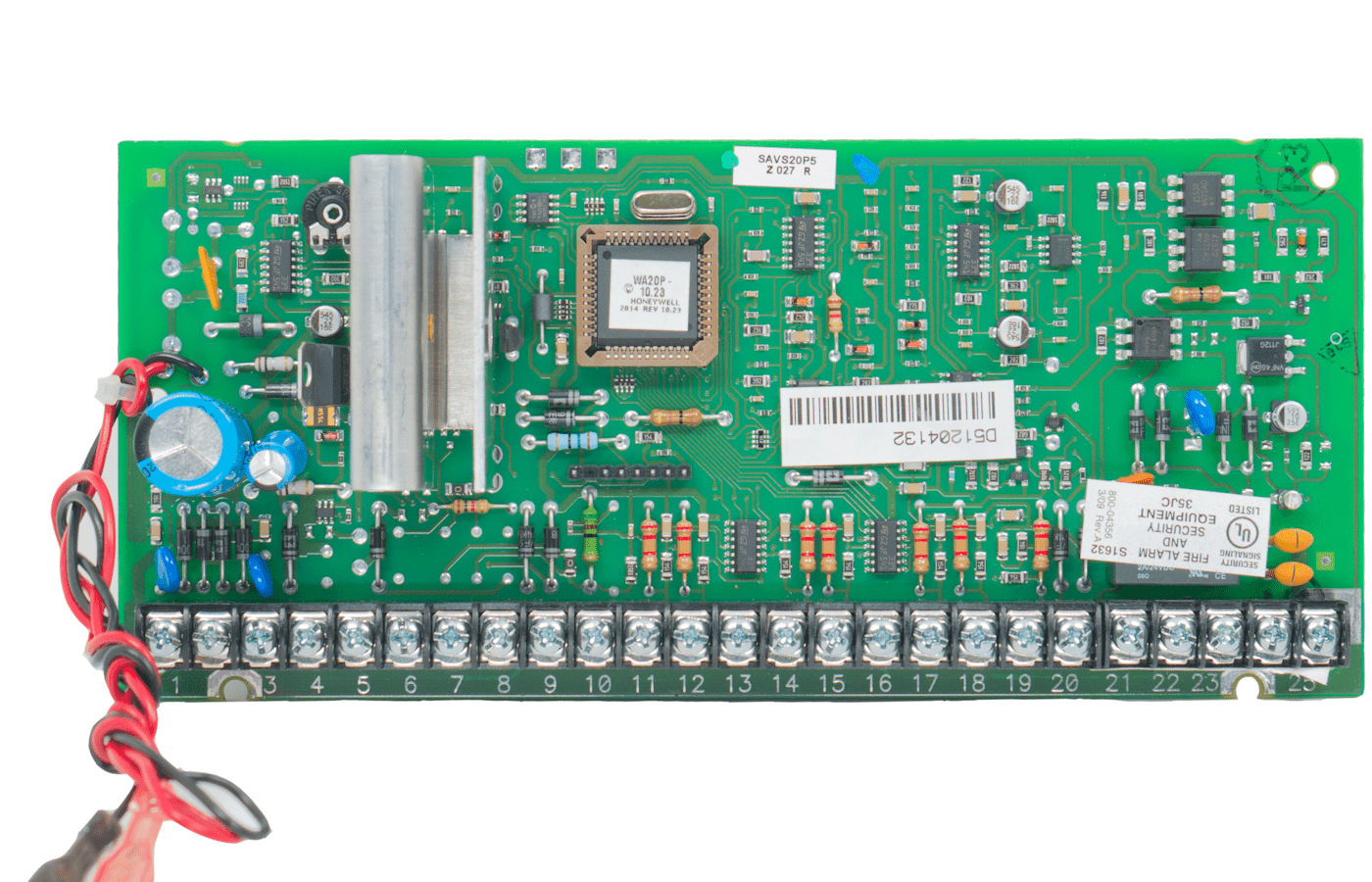
    I’ve just about got my new Konnected Alarm Panel Pro (APP) Interface Kit completely installed and working with my Vista-20P alarm panel and Hubitat C-8 automation controller. Everything seems to work pretty well, and I thought I’d note a few things here about my experience setting it up.

    As I alluded in a recent post, I managed to fit all of the Konnected boards into my Vista-20P enclosure, but it was a tight squeeze along with all of the existing junk in there (zone expander, battery, terminal strips, wire, etc).

    I started out by wiring up the zones I wanted to monitor. Most of them were attached to one of two zone expanders and wired with 1k-ohm EOL resistors. These all worked “out of the box” without the need for any tuning on the APP interface board. The only zone I had to tune was one that was wired to the main Vista-20P board as a “zone doubled” zone, with a 6.2k-ohm resistor. This required a slight adjustment to the tuning screw, but subsequently worked without a hitch. Also of note is that one of my zone expanders is mounted remotely, around 30′ or so from the panel. I had 4 zones there that I wanted to use with the APP, which meant that I needed 4 extra wires running between the expander and the panel. It worked out that I was able to reuse an existing 4x22AWG cable that was already there, sparing me from having to run more wire in the attic. With everything wired up, I was able to test things out by faulting the zones, watching the status LEDs on the expansion boards turn on and off, and monitoring the zone status on the APP’s web interface.

    I then went to the Konnected app to configure the zones and generate new firmware for the APP. In the app’s panel settings section, there’s an “Alarm System Interface” section that appears to be a one-stop shop to configure the Keyswitch and Arm/Disarm/Tripped status zone settings, but it did not work for me. I had to go in and manually configure these (see below) to get the appropriate buttons and zones to show up on the web interface. Other than that, the app-based configuration and firmware flashing worked fine, although it never seemed to detect when the panel had finished restarting, always giving me a message to “restart the app” and confirm that it had updated to the correct firmware version. Each time I did that (3 or 4 times) I found that it had updated everything correctly.

    I used zone 1 on the Vista-20P for my keyswitch zone. This works fine, but I had to wire a 2K-ohm resistor IN PARALLEL with the zone wiring, which is contrary to what the Konnected documentation shows. This was easy enough to do: just attach the resistor inside the panel between terminals 8 and 9. Then, I connected the OUT1 and OUT2 pins on the APP to the IN pins on the two Konnected interface boards, and ran wires from the relay terminals on both boards to Vista-20P terminals 8 and 9. I also checked to make sure that both relays were jumpered to NO, and the ALARM2/OUT2 switch on the APP was set to OUT2. On the Konnected app, I programmed OUT1 and ALARM2/OUT2 as Momentary Buttons, with duration set to 600ms for one of them (for arm away) and 2000ms (2 seconds) for the other (for arm stay). I had initially tried 1200ms for the latter, but it wasn’t long enough (the panel armed “away” instead of “stay”).

    I wanted to monitor armed “stay” status separately from armed “away”, so I used the two Vista-20P triggers for this, attaching each to a separate zone on one of the APP interface boards. The only confusing bit here is that there’s no zone type on the Konnected app that is really appropriate for a dry-contact relay zone. I just had to tell the app that they were window zones. Once wired up and programmed, both zones worked fine once I programmed the trigger output devices and actions into the Vista-20P (Konnected has fairly good documentation for this process). Pro tip: you can test the relays on the Vista-20P by using [Master Code}-#7-[Device Number] to activate and [Master Code]-#8-[Device Number] to deactivate. For example, if the master code is 1234 and you want to activate trigger 1 (device 17), the sequence would be 1-2-3-4-#-7-1-7. This is useful if, e.g., you want to test the alarm tripped status relay without having to actually set the alarm off.

    Konnected’s documentation uses a single trigger for armed status, and the other trigger for alarm tripped status. However, with my setup, both triggers are in use for monitoring armed status, so I needed a third trigger to detect an alarm condition. I was able to use one of my zone expander relays for this. Unlike the panel triggers, the zone expander relays use an isolated circuit, so the common pin is not connected to the panel ground. So, to get the relay to work as a “zone”, I had to add a wire between the common pin and the panel ground screw on the expander, as well as connecting the NC pin to the appropriate zone terminal on the Konnected interface board. I should probably make a diagram of all this…

    Last but not least was getting this to work with Hubitat, which was fairly straightforward. I installed the Konnected driver via Hubitat Package Manager (HPM), created a virtual device for the panel, and pointed it to the APP’s IP address. The docs stated that it would automatically create child devices for all of the zones, but I was impatient and hit the “Initialize” button, whereupon it populated everything right away. I was a little nervous that re-flashing the APP would delete and recreate all of the devices in Hubitat (potentially messing up automations) but that was not an issue: all of the existing zones continued to work, and new zones that I added showed up automagically after several minutes (no need to hit “Initialize” again). One thing I did notice was that when I renamed a zone from “Armed Away” to “Armed Away Indicator” (and changed the zone type), the old “Armed Away” device stuck around in Hubitat until I manually deleted it. Not really a big deal.

    The next step is to start using all of these new devices in some automations, and see how reliably everything works over time. I will report back on that eventually. In the meantime, it seems to work as advertised, and setting everything up was a fun way to spend this craptastically frigid and icy day.

  • More Alarm Fun

    More Alarm Fun

    I’m back to tinkering with our alarm system. In 2023, we replaced the landline phone dialer with a combo IP/cellular communicator. The manufacturer recommends connecting the communicator via the Vista-20P long range radio interface. That mostly works, but every few months or so, the panel would briefly stop “seeing” the communicator, which would cause the keypads to start incessantly beeping until someone manually cleared the trouble condition. One time, we went away for the weekend, only to return and find that it had been doing this for two days straight (our cats were not happy). Fortunately, the communicator also supports a “tip/ring” configuration that emulates a phone line, and I was able to switch over to that to (ostensibly) prevent the trouble condition. I have yet to test it, because the panel also needs a new battery, another condition that causes it to periodically go into trouble. As a result, we’ve mostly been keeping the panel in programming mode, and not using the alarm for the past few months.

    I have a new battery ready to go, but before I put everything back into service, I’m working on adding a Konnected Alarm Panel Pro Interface Kit to the system. This is a really clever system that attaches to the existing panel and makes up to 12 existing zones visible to our home automation controller. It can also arm/disarm via a keyswitch zone, and monitor arm/disarm and alarm trigger status using the Vista’s on-board relays. My initial plan is to hook the front/back/basement/patio doors, garage door, and motion detector zones up to the Konnected panel, which will make some cool automations possible, e.g. turning on the back porch light when we open the door at night, disarming the panel at the same time we unlock the back door, setting the hub mode to “away” when the alarm is armed (and vice versa), etc. As of this writing, I have all of the Konnected components mounted, connected, and powered up, and just need to hook up the zones and do the programming on the Vista for keyswitch and triggers. The hardest part of this was finding room in the panel cabinet for the Konnected boards. They are not large, but the cabinet is… rather crowded. When I installed the alarm back in 2002, I didn’t give much thought to wire management, so it’s kind of a bird’s nest in there. There is the Vista board itself, the battery, 2 terminal blocks, a zone expander, and lots and lots of haphazard wires. I was able to reposition the zone expander to make room for the new boards, but it took some very careful planning. Once everything is finished, I’m going to see if I can neaten the wiring up a little bit and maybe organize some of it with zip ties. Whatever the case, I’m looking forward to seeing how this works.

  • November 8 Post

    November 8 Post

    Lately, when I remember, I’ve taken to reading posts that I wrote here on the same month and day in previous years. WordPress makes it easy to search for all posts on a given month and day (via the monthnum and day query string parameters) and from there, I whipped up a quick PHP script to generate the appropriate search string based on the current date. It’s interesting seeing what I wrote on a given date, say, 15 years ago (and incidentally, we’re only 10 days away from the 20th anniversary of my first post). At this point, it seems like I have written posts on most days of the year, but there are a few dates with no posts, and until now, November 8 was one of them.

    I had initially been thinking about running the BWI loop this morning, but I decided I didn’t want to deal with all of the people on the trail on a mild day, so I ran on familiar roads around home, and ended up going 13.1 miles. It was my third half-marathon of the season, and I averaged 10:48/mile. I am dealing with some extensor tendonitis in my left foot, but running doesn’t really affect it much (walking and climbing seem to be the main culprits) and other than that, I have no major physical issues right now. I had plenty of energy, and finished stronger than last time I ran this distance (Oct 19) so it seems like I am getting back in shape for longer runs.

    It is getting to be time to winterize the pool. The pool has lost a lot of water the past couple of winters, making me suspect a leak, but it never seems to lose water during the summer. This afternoon, I went to check the Chlorine and water levels, and was surprised to find that the water had already dropped to about 3/4″ below the tile line. This fall has been dry and windy, so It could be due to evaporation, but it’s never dropped that much so early in the off-season. The silver lining is that it saves me work, as I won’t need to pump water out of the pool to winterize the skimmers. However, I don’t want the water level dropping too low to support the cover if we get snow this winter, so, I’m going to have to keep an eye on it, see how much it drops, and add water if needed.

    Last topic for the day is blood pressure. I have a family history of high blood pressure, and I keep mine in check with all of my exercising, but I’ve still had to take a low dose of BP meds since about age 35. The best way to stay on top of BP is to monitor it regularly at home, but I have always had kind of a phobia about taking my BP. Even thinking about it would cause my heart to start racing, and as a result, my BP would shoot up and I could never get an accurate reading. Last month, a BP scare at the doctor’s office prompted me to buy a new monitor, a Withings BPM Vision. It connects to the wifi and records all of my readings in the Withings app (and Apple Health). This has been great, because it turns out that my phobia isn’t about the actual process of taking my BP, but rather viewing the results. With the BPM Vision, I can keep the machine covered while I take my BP every day, and then wait until much later and review all of the results in the app. This seems to have done the trick: for the most part, I am now much more relaxed when I take readings, and by viewing (say) a week’s worth of readings at a time, I get a better overall picture of my BP rather than worrying about individual readings. So far, so good.

  • End of 2025 Pool Season

    End of 2025 Pool Season

    Well, it’s that time of year again. I took what will most likely be my final swim of the year yesterday. The pool temperature had been holding pretty steady at 76°F for the past couple of weeks, thanks to abundant sunshine and air temperatures hitting 80° or so most days, but all of that is going to be changing over the next couple of nights. In particular, tomorrow night is supposed to get down to the low 40s. That, combined with all of the leaves starting to fall, is going to finally put an end to swimming in 2025. In spite of a late start (June 6), a week away on vacation, and a week lost to poor weather in late August, it was a great season. I wrapped up with 82 swims, beating 2021’s count of 80, and just shy of 2022’s count of 84. I beat my previous latest swim date, October 4 (set in 2021), by 3 days. I swam 4 times in October, making this my first year with more than 1 October swim. Lastly, I set a record of 58,626 total strokes, eclipsing 2022 by around 4000 strokes.

    No end-of-season swimming post is complete without a mention of our all-time latest date in the pool, October 9, 2007. It’s taken 18 seasons to come this close to matching that date, but it appears that the record is going to stand for another year. Earlier this season, out of curiosity, I took a look at historical climatology data for September-October, and 2007 was an outlier — the weather was warmer and drier over that period than any other year we’ve owned our pool. Our kids were little then, and they were the last ones in the pool that year — this year, it was me, swimming my laps. My wife and I are getting more apt to swim in cooler water as the years go by, so I’d say that the odds of October swimming happening are increasing year-to-year, but who knows if we’ll be in the house long enough to have a shot at that elusive October 10 swim.

    After struggling with calf tightness for most of the summer, I gave up backstroke at around the end of August with the intention of working on my kicking next year. For a couple of weeks, I also gave up front crawl, and was swimming 6 sets of 60 breaststroke/60 butterfly for a total of 720 strokes, which was rather taxing on my shoulders. Eventually, I corrected my front crawl kicking, and switched to 4 sets of 60 breast/60 butterfly/60 front crawl. At the very end of the season, I reintroduced a tiny bit of backstroke, swimming alternating sets of 60 breast/60 butterfly/60 front crawl and 45 breast/45 front crawl/45 butterfly/45 backstroke. At this point, I feel pretty good about my front crawl kicking, but still have work to do with backstroke.

    So long, 2025 swimming season. We’ll see what 2026 holds in store!

  • Night Swim

    Night Swim

    I finally got out for an after-dark swim tonight. It only took until the end of the season. I often take night swims in August and September, but up until today, this year had been an exception. I’m kind of amazed that I’ve never had to replace the bulbs in either of the underwater lights in 24 seasons. I have no idea how old they were when we moved into the house. They just keep going and going. The bulbs are something like 300 watts each. When I turn them on, I think the lights on the entire block dim. We probably should replace them with low-voltage LED lights, but we don’t use the lights enough to make it worth the expense.

    It’s been a good swimming season. Today was my 76th swim, eclipsing last year’s total of 75. I’ve also passed 2022’s latest swim date of September 27. If I can swim one more time this year, I’ll set a record for stroke count, passing 2022’s mark of 54,696. Two records that likely will stand are 2022’s total count of 84 swims, and 2021’s latest swim date of October 4. To hit 84 this year, I’d have to swim until at least October 6, which I don’t see happening. Swimming later than October 4 is not out of the realm of possibility, but we’ve got a cool-down coming at the end of this week, so I’d say it’s unlikely. You never know, though!

  • This year’s pool hack

    This year’s pool hack

    Pool season is winding down. This year, we added a Betta SE robotic skimmer to our arsenal of pool gadgets, and it has worked out pretty well, although it is definitely most useful in July and August, when it can run 24×7. It can’t quite keep up with the massive onslaught of Tulip Poplar leaves in late summer, not that I really expected it to. It also can’t run when the Polaris is in the pool, as it gets caught on the hose. Next year, I may consider adding a cordless robotic vacuum like the Aiper Scuba S1, which I’ve read extensively about on troublefreepool.com. I don’t foresee getting rid of the Polaris, but it would be great to have something that can run at the same time as the Betta for day-to-day cleaning.

    Speaking of the Polaris, it wouldn’t be a proper pool season if something didn’t go wrong with it. This year’s issue was mostly our fault, as we’ve been connecting and disconnecting the hose a lot more often (because of the Betta) and instead of using the quick release, we’ve been screwing it in and out of the wall fitting. I think over time, this has worn the threads down on the fitting, and when I went to run the Polaris a week or so ago, the fitting would no longer stay screwed in to the wall. As a cheap fix, I went to Lowes and picked up a 1.5″ PVC male and 1.5″ female adapter, and cemented them together to make a short extension. I screwed the Polaris fitting into the female side, and the male side into the pool wall fitting. I’m not sure if the issue was with the Polaris fitting or the wall fitting, but either way, now the hose no longer ejects out of the wall when I turn the booster pump on. I suspect that the new fittings provide a little bit more good thread for everything to screw together securely.

    We’ve got a coastal storm working its way inland just to the south of us, so it’s been kind of a dreary, breezy, rainy day. In spite of that, I managed to get in the pool for my laps. I’m not sure what the water temperature was, but it felt warm compared to the 67°F air with chilly drizzle. There’s a warm-up coming later this week, so I’m hoping for a couple more weeks of swimming this year.

  • 2025 Pool Season

    2025 Pool Season

    It was a late start to pool season this year, thanks to a very cool and wet month of May (not that I’m complaining by any means). In most years, we try to have the pool open by Memorial Day weekend, but this year, we held off for another week, uncovering it on June 1. My first swim was yesterday (June 6), and the water temperature was still only 76°F. I used the tether, and picked up right where I left off last year, swimming 3 sets of 60 breaststroke, 60 front crawl, 60 butterfly, and 60 backstroke, for a total of 720 strokes. I’m going to try to swim more days than not this season, and we’ll see how that goes. I missed today because I was too busy vacuuming and cleaning the pool. The good news is, I think there is light at the end of the tunnel with regards to the massive chore that is spring pool opening.

    This is our second year with a variable speed pump. Even running it 24/7, it uses less than half the electricity than our old 1hp single speed pump used running 12-14 hours/day. Most of last year, I ran the pump at 2600rpm in the morning, 1750rpm in the afternoon/evening, and 750rpm overnight. This year, at least for now, I’m running it at 1750rpm for 13 hours and 750rpm for 11 hours, with occasional “boosts” to 2600rpm to run the pool cleaner. With electricity getting more and more expensive, the VS pump has been a big win, but the trade-off is that the skimmers don’t work as well at the lower pump speeds. Last year, I found myself manually skimming the pool surface much more often. I’ve ordered a Betta SE Plus solar-powered skimmer robot, and am hoping it will help. Also, anecdotally, it seems to take more work to get the pool fully clean and clear during opening. The past two seasons, I’ve been vacuuming to waste, then running the Polaris to pick up the larger debris, and then vacuuming again to the filter to get the rest of the fine particulate crap up off the bottom. In prior years, the final vacuuming step was not needed. This may be more an issue with the Polaris not working as well as it should, though (long story that probably warrants a separate post).

    My Autopilot salt chlorinator is acting as flaky as ever this season — a lot of the time it works fine, but often, I see intermittent “check/clean cell” and “low amps/cell” errors flashing on the display, with volt/amp readings all over the map when it is happening. At one point, I got the error condition to clear up by going into the maintenance menu and selecting “force reverse”. Last year, I had the same issue at one point, but it cleared up and the system ran flawlessly for most of the season. I am wondering if it is finally time to replace my salt cell, which is way past its prime. It has outlived the original DIG-220 control unit as well as the original tri-sensor. The cell has been in service since 2009! Its stated lifetime, per Autopilot, is 60,000 amp-hours, and it has about 43,000 amp-hours with the current controller, which I put in service in 2019. That’s about 7200 amp-hours per season over 6 seasons. Before 2019, it ran with the old controller for 10 seasons (2009-2018). If we assume similar usage over those 10 seasons (I never checked the amp-hour reading on the old controller), then the cell has seen about 7200*16 or 115,200 amp-hours of usage. That’s almost twice the expected lifetime!! I’ve had a new cell on hand for 5 or 6 years, and every year, I debate whether to put it in service, but the old one just seems to keep on going. Maybe the time has finally come to retire it.

    In any case, I’m hoping that within a week or so, I’ll be spending more time swimming than I am maintaining the pool.